To recognize revenue for a $0 contract extension in ScaleXP, raise a manual invoice that spreads the remaining revenue over the new contract period: use Option 1 when the extension adds new services and Option 2 when it adds no new services.
Tip: Where the extension is a straightforward free period on a single performance obligation, or the contract had a free period built in from the start, the recommended approach is now to add accrued revenue and release it evenly over time; see How to handle revenue recognition for multi-year contracts with different annual amounts, free periods, and contract extensions for the steps and worked examples.
Option 1: Recognize revenue for a $0 contract extension with added services
In this case the value already recognized remains unchanged, but the amount deferred needs to be spread over a new recognition period.
- Go to the Customers tab, find the relevant customer, and click Add Manual Invoice.
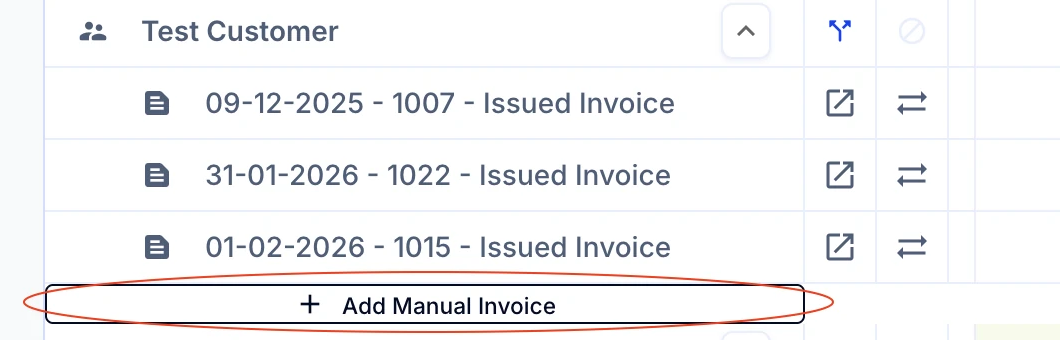
- Raise the manual invoice with the following characteristics:
- Invoice date = extension date
- Line item 1
- amount = deferred revenue balance at end of prior month
- start date = invoice date
- end date = new contract end date
- account = same as initial invoice
- Line item 2
- amount = negative of Line item 1
- start date = invoice date
- end date = previous contract end date
- account = same as initial invoice
For example, Test Customer had a contract period of 1 year which has been extended by 6 months at 0 extra value from March 2026. Assume this invoice reflects the original 1-year contract.

- From our example, we have a $5,000 invoice which was initially spread over 12 months equaling $417 per month.
- The contract extension date was established in March meaning, the first 3 months of the contract (December - February) should remain spread as $417 p/m for revenue recognition purposes.
- The remaining $3,750 ($5,000 - $1,250 for 3 months) is to now be spread over 15 months from March rather than the initial 9 months.
- Therefore, the new revenue recognition should look like $250 p/m ($3,750 / 15 months).
Tip: You can see this on the Deferred Revenue Journal by selecting the prior month as your month end date. This will show the deferred revenue balance as of that date for every customer and invoice.
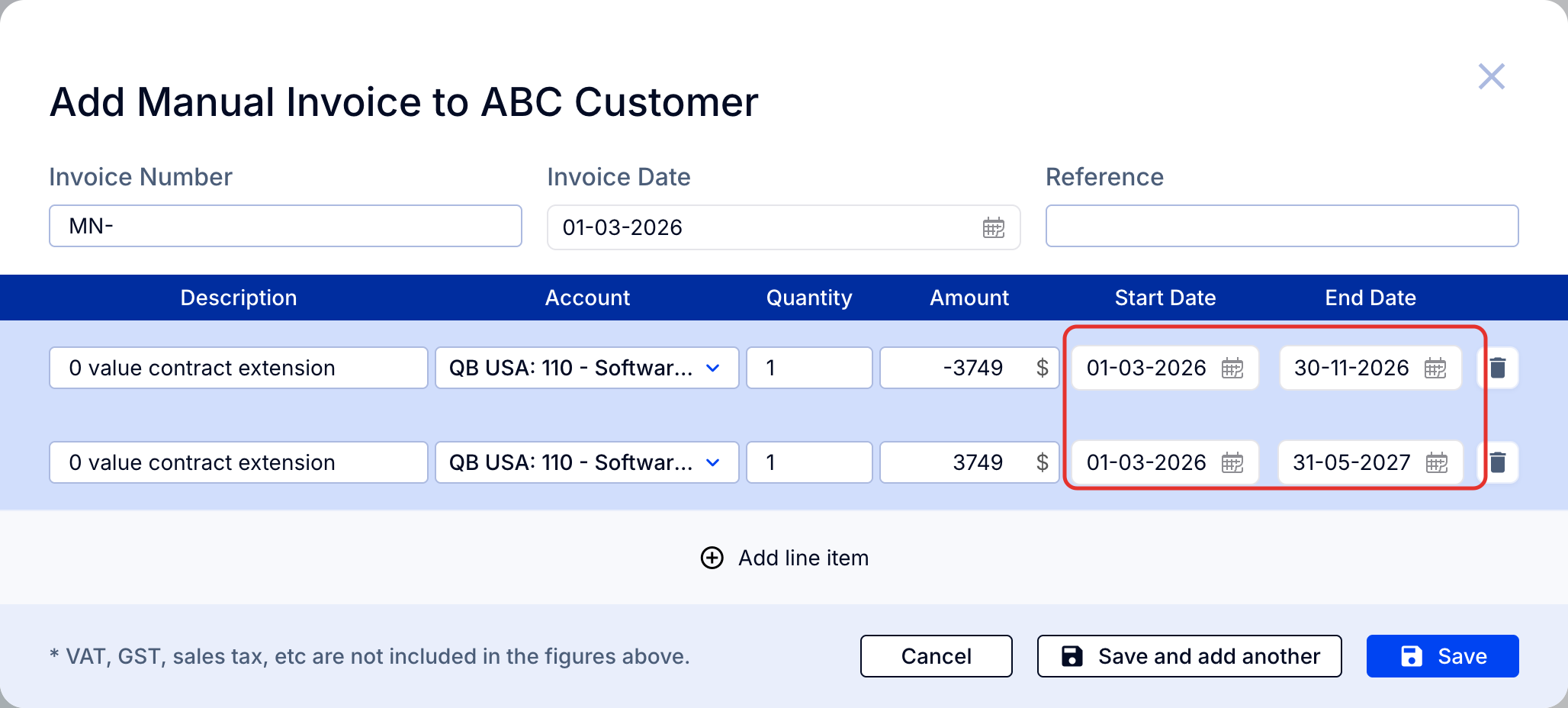
Enter the remaining balance at the extension date.

As you can see above, the revenue is now calculated as $250 p/m both with the original invoice (original contract ($417 - $167 = $250)) and the contract extension.
Option 2: Recognize revenue for a $0 contract extension with no new services
In this case the value already recognized needs to change so that the revenue is all recognized over the new, longer, contract period.
As the contract period has been extended, the previously recognized revenue will be higher than the new amounts.
Using IFRS / GAAP rules, this will lead to a one-time adjustment at the time of the extension to reduce revenue as a catch-up for prior periods.
When viewing in MRR or Revenue Recognition, on the other hand, the revenue will be spread backward to reflect the new allocation over time.
- Go to the Customers tab, find the relevant customer, and click Add Manual Invoice.
- Raise the manual invoice with the following characteristics:
- Invoice date = extension date
- Line item 1
- amount = original invoice amount
- start date = original invoice date
- end date = new contract end date
- account = same as initial invoice
- Line item 2
- amount = negative of original invoice amount
- start date = original invoice date
- end date = previous contract end date
- account = same as initial invoice
Tip: We recommend referencing the original invoice number to ensure better audit tracking.
Important: Make sure to select the same GL account.
For example, if this is the original invoice:
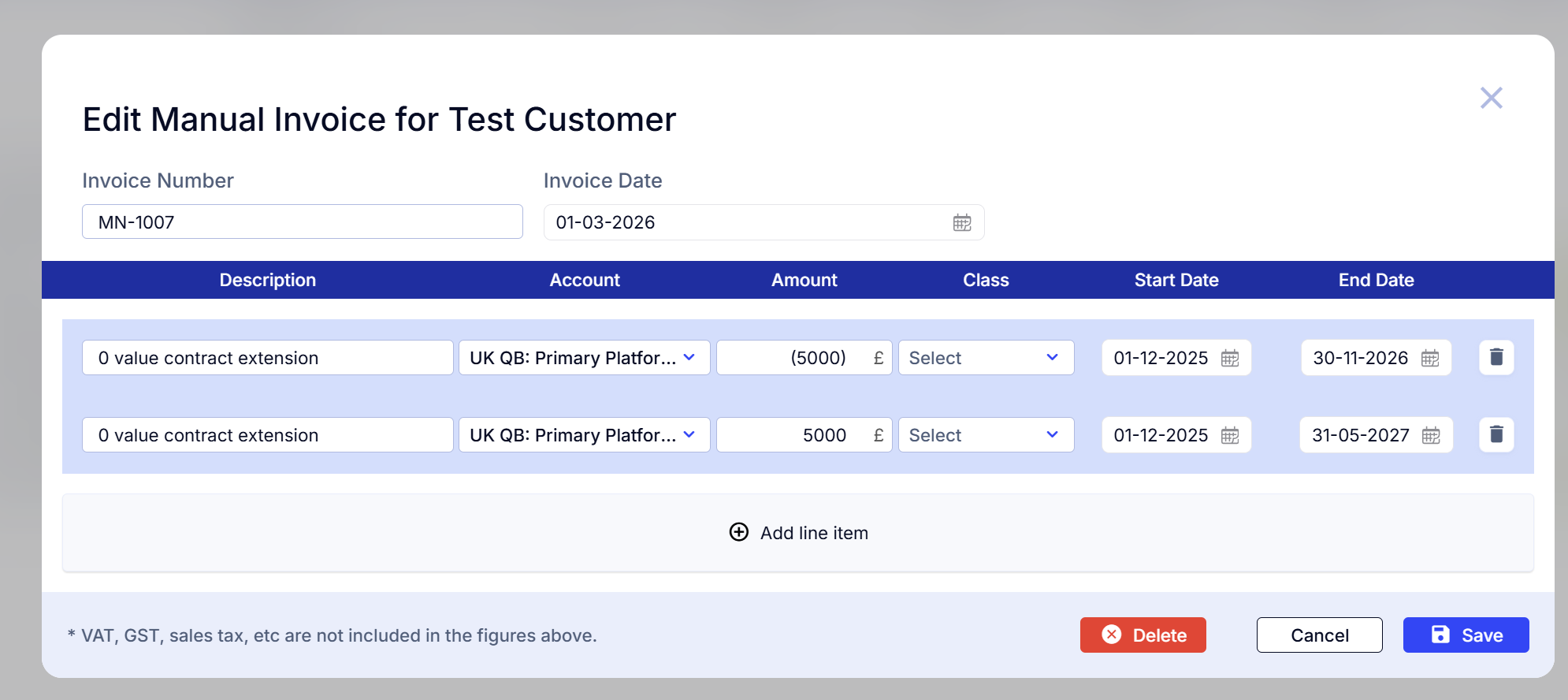
This is the suggested manual invoice to add:
Accounting requirements (US GAAP and IFRS)
Here is a brief summary of the applicable revenue recognition rules under accounting standards for both IFRS 15 and US GAAP (ASC 606).
Note: This guide is for information only and not professional advice. These rules are always subject to change and to interpretations for your specific circumstances. That said, we hope you will find this helpful in demystifying and simplifying revenue recognition for your business.
There are four possible requirements when you extend an existing service contract.
1. Separate contract
If there are additional fees associated with additional services, this will generally be treated as a separate contract and the revenue will be allocated across the new service dates.
2. Contract modification - extended new services
If additional services are promised but they are not associated directly with additional fees, then this is considered a contract modification. If the new services are easily separable from the ones already delivered, then the modification applies only from the time of the extension. That is, the amount of revenue not yet recognized is spread over the new service period, but the previously recognized revenue, for the services already delivered, remains unchanged. This is the most common recognition method for SaaS businesses offering free contract extensions, often used alongside other product sales.
3. Contract modification - no new services
If the contract length is extended but no new services will be delivered or the services are considered to be part of a single performance obligation, then a cumulative catch-up adjustment is required to bring the previously recognized revenue in line with the new recognition amount for that period. That is, a one-time reduction in revenue is required at the time of the extension, followed by lower monthly recognition amounts until the new contract end period.
4. No change required
If there is a contract extension but no new service obligation or payment, then there is likely no need to change the accounting treatment of the existing invoiced revenue related to the contract.
We will focus here on the contract modification scenarios as these require a bit of extra input to automate revenue recognition in ScaleXP.