Revenue Recognition shows revenue in the period the service is provided and is for reporting; IFRS / GAAP is the view used for month-end journals by default.
Revenue recognition versus IFRS / GAAP view
Revenue recognition view
Revenue Recognition shows revenue in the period the service is provided, including partial months, and ignores the invoice date. It is also the basis for the MRR and ARR views. See How ScaleXP allocates the spread of revenue and cost and Revenue setup 1: Configure and validate revenue recognition.
This view is for reporting. Month-end journals use it only if Journal Calculation in Revenue Journal Settings is set to Revenue Recognition (by service dates), which support can change for you.
IFRS / GAAP view
IFRS / GAAP also shows revenue in the period the service is provided, including partial months. However, any revenue earned before the invoice issue month is recognized in the month the invoice is issued.
This is the view ScaleXP uses for month-end journals by default. See How to set journals to IFRS or GAAP rules for backdated revenue.
Why journals use the IFRS / GAAP view
The IFRS / GAAP view stops late invoices from changing revenue in months you have already closed. It also makes it easy to match ScaleXP to your accounting system, so you can validate and document your accounting revenue.
This means your journals will not exactly match the Revenue Recognition, MRR and ARR views, which always recognize revenue in the month of service, whatever the invoice date.
How to tell which view is being used in your journals
Accrued revenue is treated in the same way in both reports - it is included in the month of accrual.
In the deferred revenue journal, there is a difference in the way backdated revenue is treated, as described above.
To check which view is being used in your deferred revenue journal, see Section 4, How the numbers are calculated. The last line, Revenue recognized - ScaleXP, names the view used.
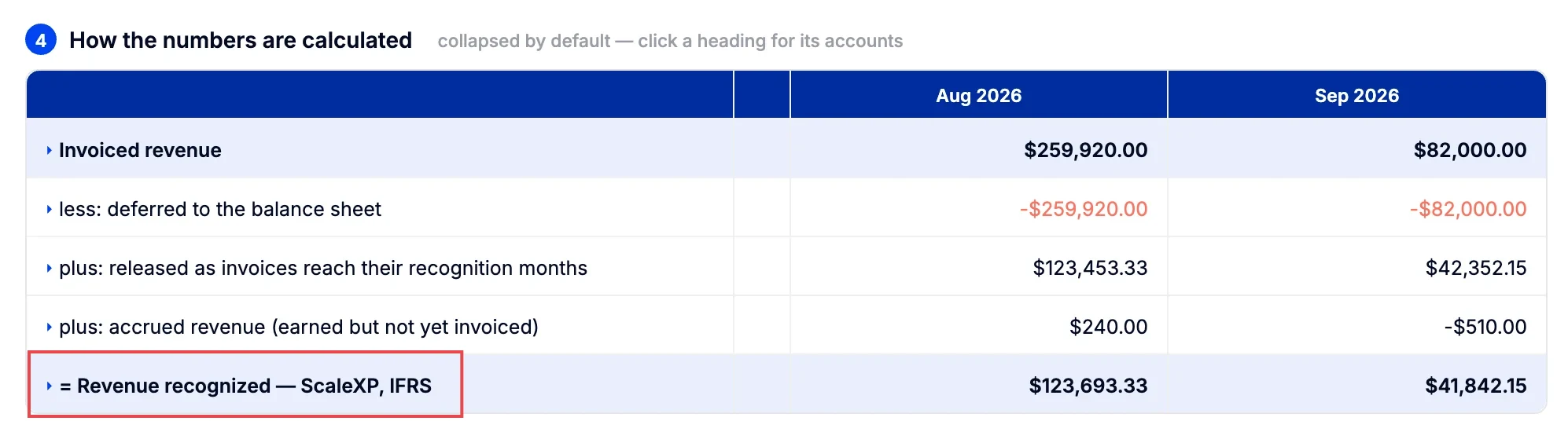
In this example, the deferred revenue journal is using the IFRS / GAAP methodology of revenue recognition, so backdated revenue is recognized in the month of invoice.
Common reasons why this report might differ from your accounting system
- Uninvoiced revenue - any revenue that has been directly received/transferred into a bank account without an invoice.
- Different selection of accounts - you have not selected all the relevant revenue accounts on the Customers tab. See more here: How to filter accounts on the Customer page.
- Adjustments not in ScaleXP - in the form of manual journals that affect the revenue accounts on the Customers tab.
- ScaleXP journals not yet posted - the balance sheet position and revenue recognition may be out of sync because the month has not been closed yet.
Questions this article answers
- Why doesn't my reported revenue match my revenue recognition report on the Customers page?
- My deferred revenue journal balances, yet my revenue recognition doesn't match my Xero or QuickBooks for that account - why?
- Why are my journals moving revenue into a different month than the start date?