To find backdated invoices, sort the New Customer Invoices page by start date and look for start dates before the invoice issue month.
1. Find invoices that affect months before their issue date
The quickest way to find revenue that affects prior periods is the New Customer Invoices page. This page looks at invoices one issue month at a time.
- On the Journals tab, open Month-End Close and click Open on New Customer Invoices in [month].
- Sort by Start Date so that the earliest date is listed first.
- Look for start dates which precede the invoice issue month.
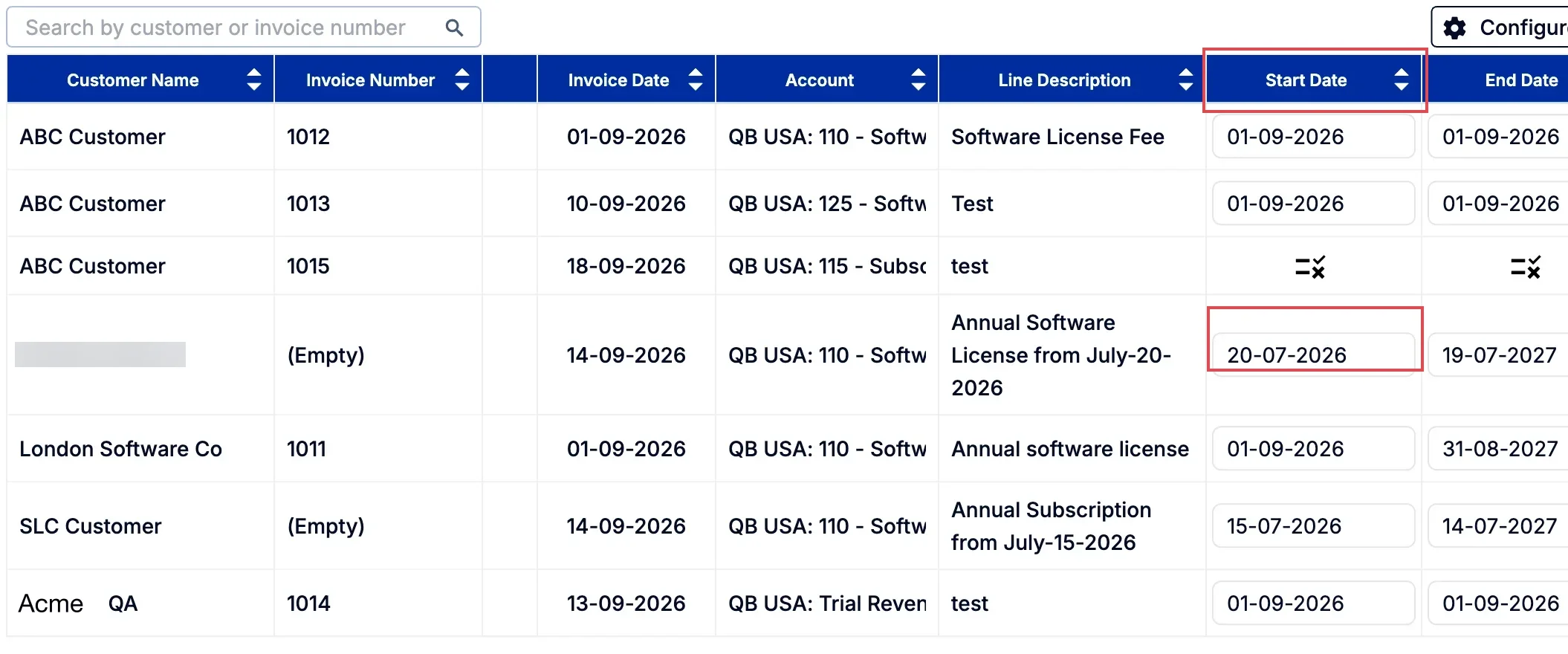
- Repeat as required.
Note: Another option is to use the Accrued revenue page to review invoices suggested for accrual.
How ScaleXP recognizes backdated revenue
For purposes of Revenue Recognition, MRR, and ARR reports, ScaleXP will always recognize revenue according to the indicated service Start Date and End Date. The invoice issue date is never taken into account for these types of reports.
For purposes of IFRS / GAAP reporting as well as your suggested accounting journals, ScaleXP will consider the issue date as follows:
- For IFRS / GAAP reporting, any unaccrued backdated revenue will be pulled forward to the month of invoice.
- For deferred revenue journals, the balance sheet will always exclude any revenue from invoices not yet issued at the balance sheet date.
- ScaleXP will suggest accruing revenue for future-dated invoices. You can choose to accept these suggestions or not.