ScaleXP imports invoice-level detail by customer, your full P&L and balance sheet and Xero tracking codes (if you choose to import them) from the accounting system, and the sales pipeline, won and lost deals, and renewals from your CRM.
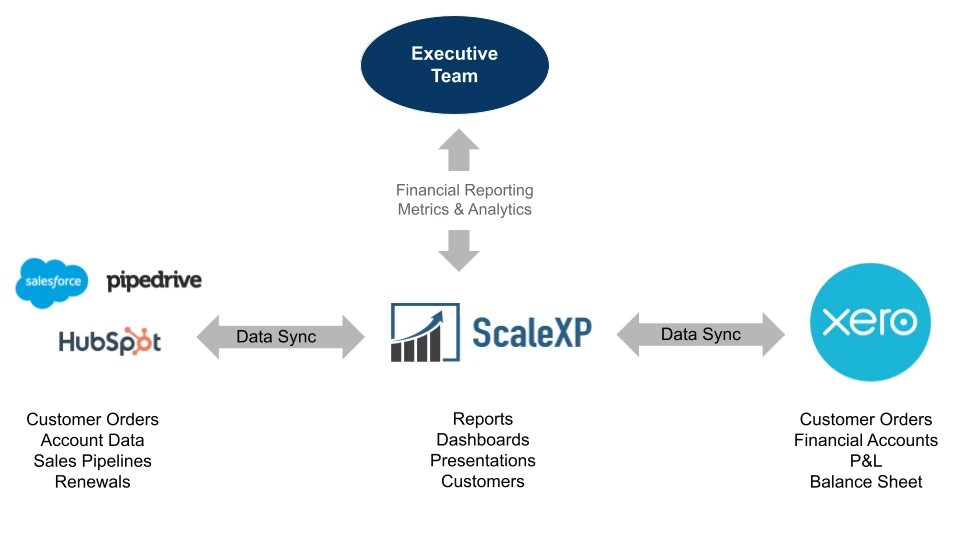
What ScaleXP provides
ScaleXP integrates Xero and your CRM system (HubSpot, Salesforce or Pipedrive) and provides a full suite of automated metrics and KPIs for B2B companies:
- MRR, ARR, customer lifetime value, customer acquisition cost
- Active, lost and new customers, with the ability to customize the definitions to your specific business
- Dashboards displaying key metrics in interactive graphs
- Consolidation across countries and currencies
- Fully integrated Xero tracking codes
Data imported from the CRM system
Data imported from the CRM system includes:
- Sales pipeline including the number and value of the deals
- Full tracking details on the time spent at each stage of the pipeline, deal by deal
- Deals won and deals lost, by name
- Renewals pipeline including the number and value of the deals
- Renewal deals won and deals lost
Data imported from the accounting system
Data imported from the accounting system includes:
- Invoice level detail by customer
- Full P&L and balance sheet
- Xero tracking codes, if you choose to import them, allowing you to create bespoke reports (even across countries or currencies)