Link each renewal deal to its original deal so ScaleXP can track contract cycles, renewal status and future revenue automatically.
Before you start
- Review ScaleXP CRM integration best practices before configuring renewal automation.
1. Automatically create the renewal deal
- When a deal is marked Closed Won, your CRM should automatically create a new renewal deal representing the next contract period. This is the trigger we recommend.
See ScaleXP CRM integration best practices.
2. Store the renewal deal ID on the original deal
- To link the deals together, create a CRM field on the original deal called something like Renewal Deal ID.
- When the renewal deal is created in Step 1, your workflow should automatically populate this field with the ID of the renewal deal.
Typical automation flow
- Original deal becomes Closed Won.
- Workflow creates the renewal deal.
- Workflow writes the renewal deal ID into the Renewal Deal ID field on the original deal.
This creates a permanent link between:
- The original contract deal
- The renewal opportunity
ScaleXP reads this field during the CRM sync to understand which deals represent renewals.
3. Configure the renewal field in ScaleXP
- In ScaleXP, go to Load Data (top bar) > Connections (left sidebar), click the three-dot menu on your CRM card and select Configure.
- In the Renewal Deal Reference field, select the deal field that contains the link to the renewal deal.
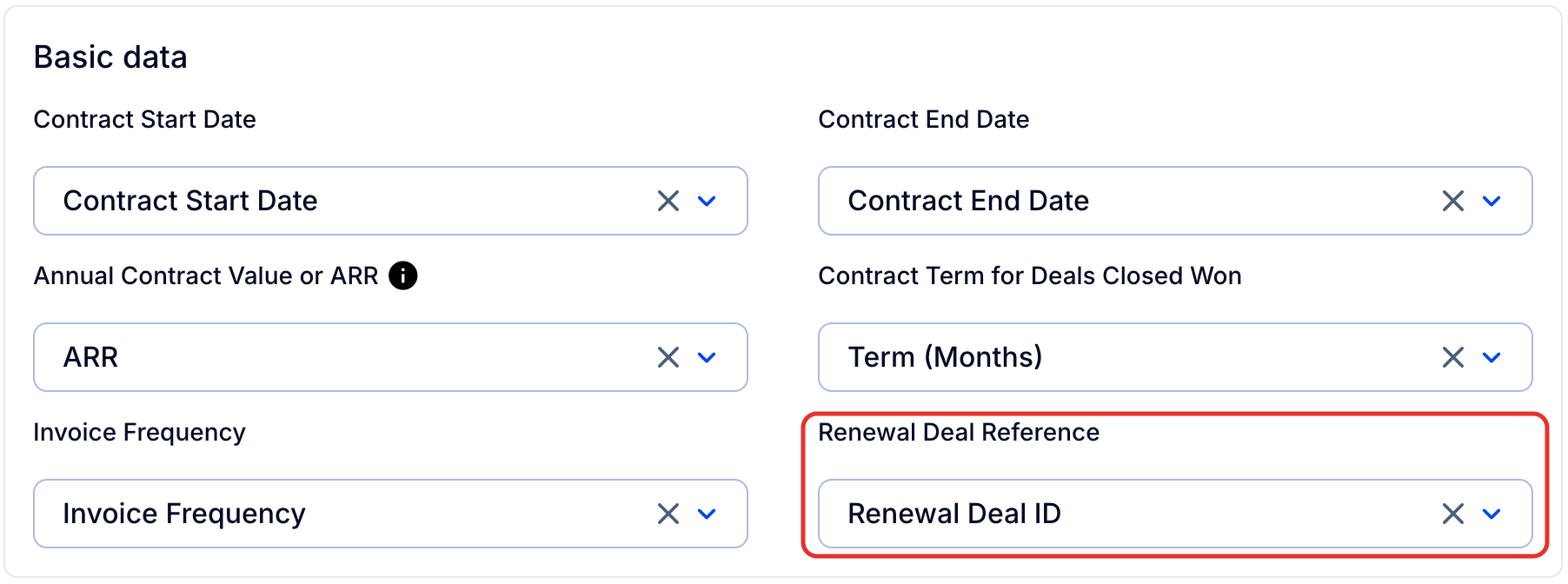
Once selected, ScaleXP will automatically associate the original deal and the renewal deal.
This relationship is then used to track contracts and renewal opportunities automatically.
4. Choose how linked renewals are valued
By default, a linked renewal is valued at the full value of the renewal deal. You can change this in the Renewals settings:
- Go to the Renewals page, open the Config view and click the settings (cog) icon, top right (tooltip Change config), to open Settings.
- Under Linked CRM renewal value, choose one of:
- Full expected value (default): the renewal is valued at the full deal value.
- Probability-weighted: while the renewal deal is in progress, its value is the deal value multiplied by the win probability of its current stage. Once the deal is won, the full deal value is used.
- Click Save. ScaleXP reprocesses your contracts and the page reloads when it finishes.
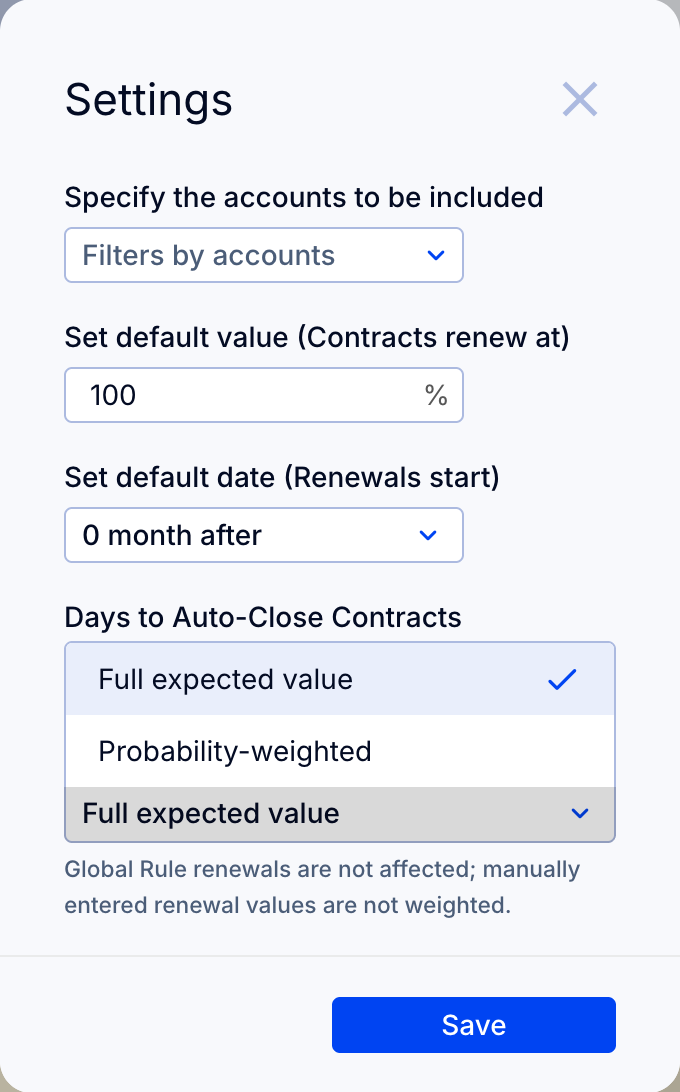
Note: This setting only affects renewals linked to a CRM deal. Global Rule renewals are not affected, and manually entered renewal values are not weighted.
On the Renewals tab, the Stage column shows each linked deal's stage with its probability, for example Negotiation (60%). Hover the info icon next to a linked renewal's Value to see the deal value, the stage and whether the value was weighted. Contract Value always shows the full deal value.
What happens after the renewal is linked
Once the renewal deal is linked:
- Renewal opportunities automatically appear in the Renewals tab, giving teams visibility into contracts approaching renewal
- Renewal opportunities feed directly into your revenue forecast
- Renewal links are refreshed automatically during the daily CRM sync
This ensures that renewal tracking and forecasting remain accurate and up to date.
How it works
When configured correctly, ScaleXP detects the relationship between the original deal and the renewal deal, so it can track contract cycles, renewal status and future revenue automatically.
Automatically linking renewal deals allows ScaleXP to track contract renewals and forecast future revenue accurately.
When renewal deals are linked correctly, ScaleXP can:
- Automatically include renewals in your forecast, valued at the full deal value or, if you choose, weighted by the deal stage probability (see Choose how linked renewals are valued)
- Ensure renewals never slip through the cracks by creating a clear renewal opportunity for every contract
- Provide visibility into upcoming renewals for Customer Success teams
- Track the full lifecycle of a customer contract across multiple renewal periods
When a renewal deal closes, ScaleXP automatically creates the next contract period, ensuring continuity across contract cycles.